
Turning Sales |  | by Raymond P. Woerner |
You need sales data to fill orders, collect payments, and restock merchandise -- it's vital to the daily operation of a business. Sales data is the most detailed source of business information. However, this information is of limited use until it's summarized to provide answers to important business questions. Questions such as "Which of my product lines are growing?" and "Where is my business expanding?" cannot be answered with raw sales data.
The Crosstab Query
Fortunately, MS Access provides a tool to summarize information called the crosstab query. A crosstab query summarizing total sales by month for each product tells you which product lines are growing. Another crosstab query of total sales by month for each region of the country shows where your business is expanding.
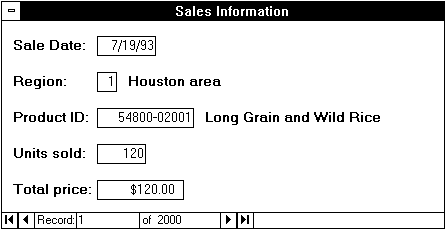
Let's use a fictitious grocery wholesaler as an example. They sell a dozen products in four regions of the country. Their sales data consists of sales date, region of the country, product identification, number of units sold, and extended price. Figure One shows a typical entry.
Figure
1
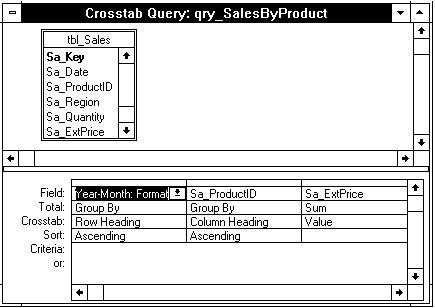
How do they set up a crosstab query giving them total monthly sales by product? First, we must convert the sales date to the format needed for our analysis. Figure Two's Year-Month field takes the sales date and creates a field with the full year and month using the statement: Year-Month: Format$ ([Sa_Date], "yyyymm") For example, the date 07/19/93 will be converted to 199307.
Figure
2
We'll group by our new date and use it as our row source after sorting it in ascending order.
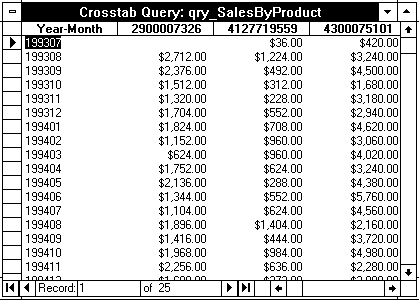
Second, we use our product identification number as our column heading. We also want to group by product identification after sorting it in ascending order. At this point, our query has products by month. In our final step, we use the sum of the extended price as the value in our product by month tabulation. Figure Three shows part of the result.
Figure
3
More Ideas
There's no need to stop with one crosstab query or with MS Access. The sales data in our example can also summarize sales by region. You could change the query to produce summaries by week or by quarter. The results of your queries can be exported to Excel for further analysis. You could build a data warehouse in Access to hold your summary information long after you've deleted the sales data. You've got the sales data, mine it for business information!
Ray Woerner, a HAL-PC member, is the owner of Sage Database Incorporated. He does applications development in Microsoft Access, Excel and Visual Basic.
E-mail me at webmaster@hal-pc.org with any comments you have and tell me what you want to see here.
Back to the User Journal Home Page